An endless minesweeper field. Every open number counts the mines in the eight cells touching it. Open safe cells to score a point each; clear every safe cell of a 16 by 16 region for a bonus.
Infinite Minesweeper: The Field That Never Ends
Classic minesweeper on a field with no edges: open safe cells, flag the mines, clear 16×16 regions for bonuses and travel as far as you dare. Four mine densities, Classic or Relaxed rules, a daily field, seeds to share and a safe hint backed by a real solver.
What is Infinite Minesweeper?
Infinite Minesweeper is the classic mine-finding puzzle on a field that never ends, free in your browser on phone, tablet and computer. The numbers work exactly as they always have: each one counts the mines in the eight cells touching it. What changes is the edge. There isn't one, so every run is a journey outward from a safe start, as far as your logic (and your nerve) will take you.
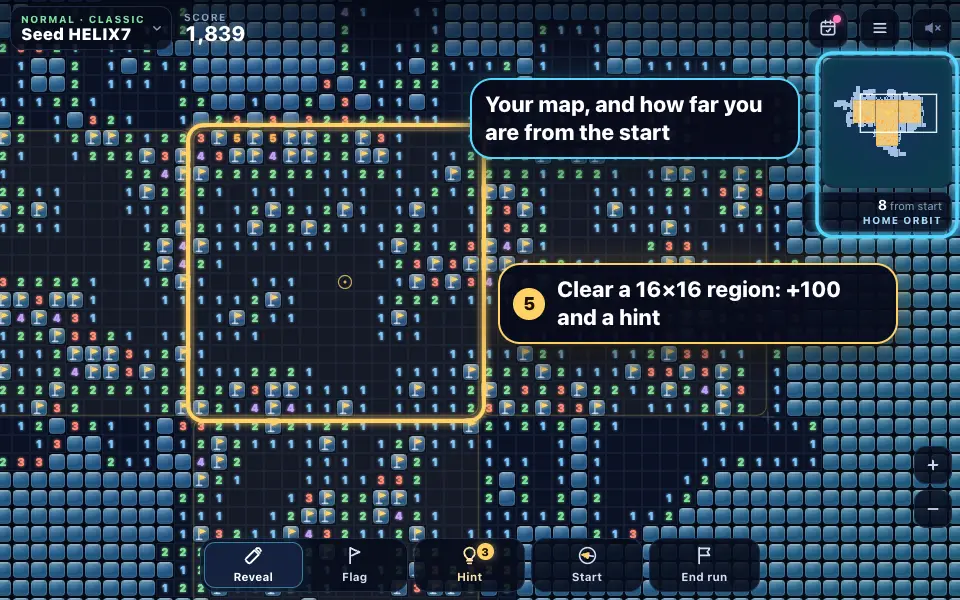
Every open cell scores a point, and clearing every safe cell of a 16 by 16 region adds a bonus of 100 and earns a safe hint. The further you travel, the more the field changes colour, and with deepening on, the more mines it holds. Play Classic, where one mine ends the run, or Relaxed, where you have three lives and a mine you hit stays marked on the field.
The field is made from a seed, a region at a time, so the same seed is the same field on every device. Share a seed with a friend and compare how far you each got, or play the daily field, which is the same for everyone today. Your run saves as you go, so you can close the page and carry on later.
How to play Infinite Minesweeper
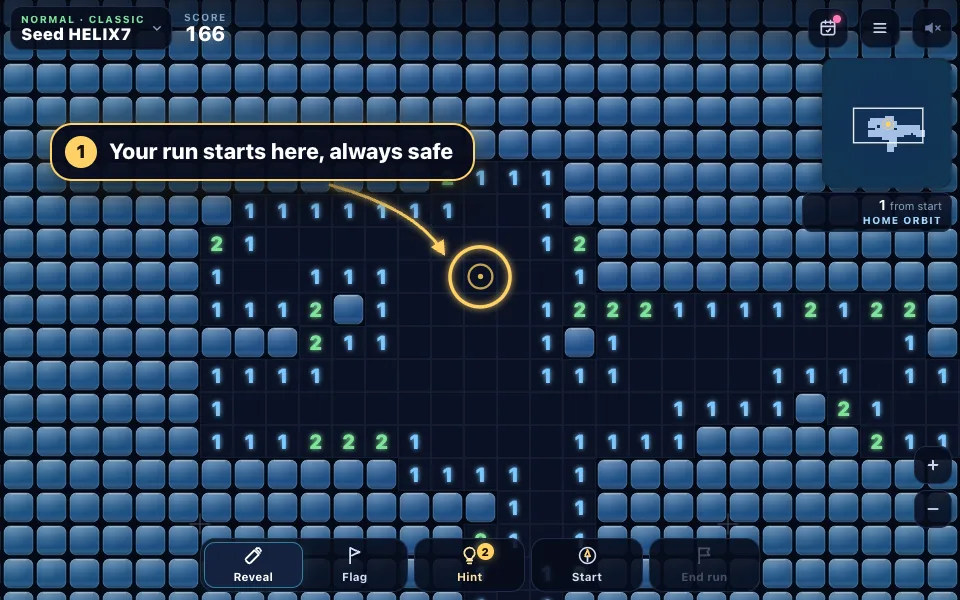
Start from the safe opening
Every run begins at the gold start ring, which is never a mine, with the cells round it already open. The field goes on in every direction from here.
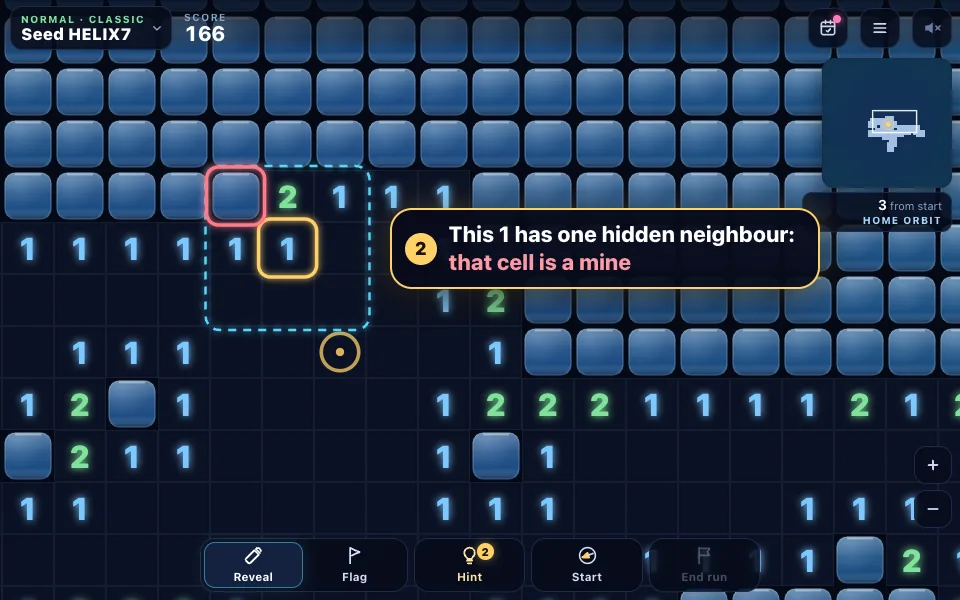
Read the numbers
A number counts the mines in the eight cells touching it. When a 1 has only one hidden neighbour, that cell must be the mine.
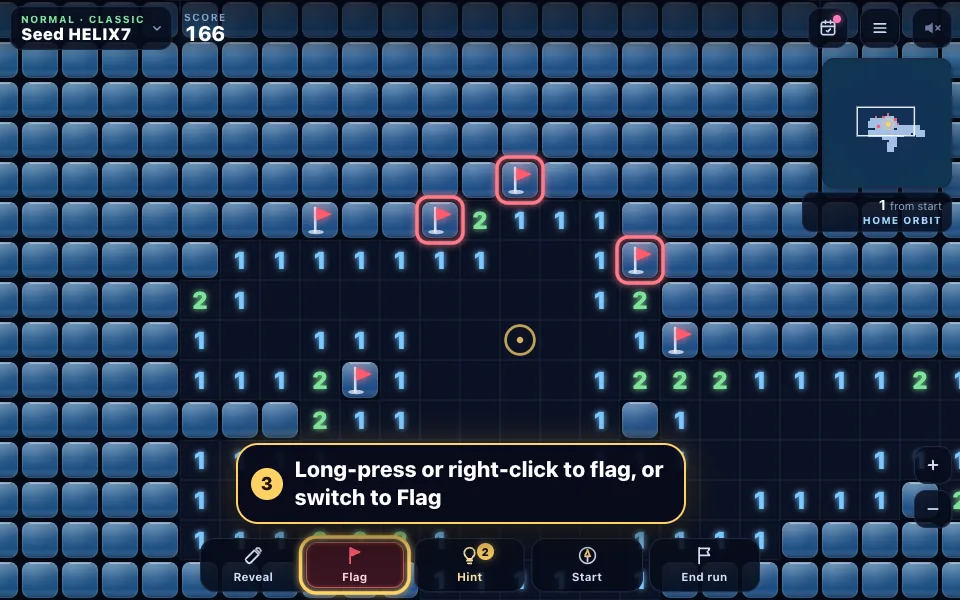
Flag the mines
Long-press a cell or right-click it to plant a flag, or switch the bar to Flag so a tap flags. Flags mark mines and protect them from a stray tap.
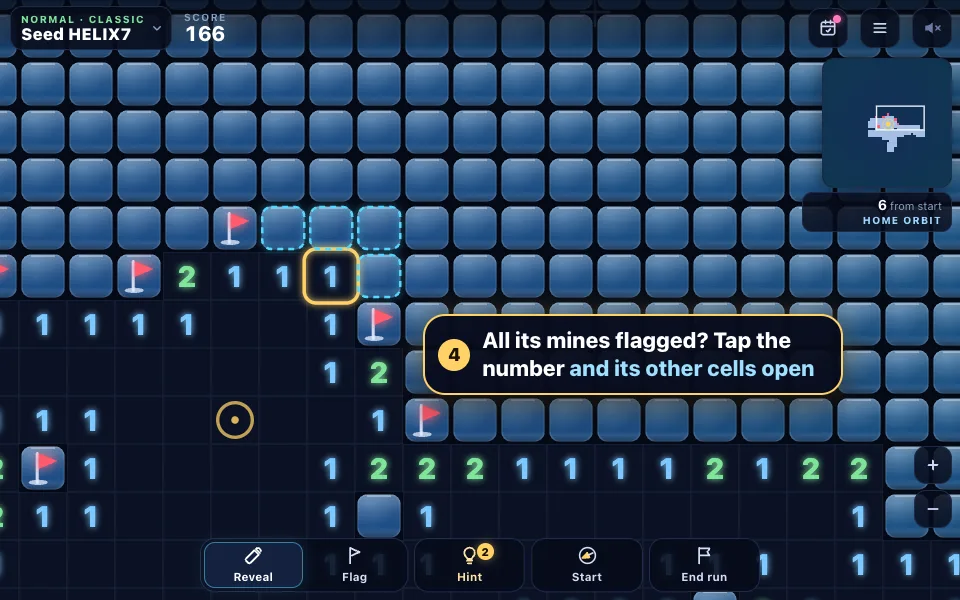
Open round a number
When a number has all its mines flagged, tap the number to open every other cell round it in one go.
Clear regions and explore
Open every safe cell of a 16 by 16 region for 100 bonus points and a hint. The map in the corner shows what you have explored, with your distance from the start beneath it.
Use a safe hint when stuck
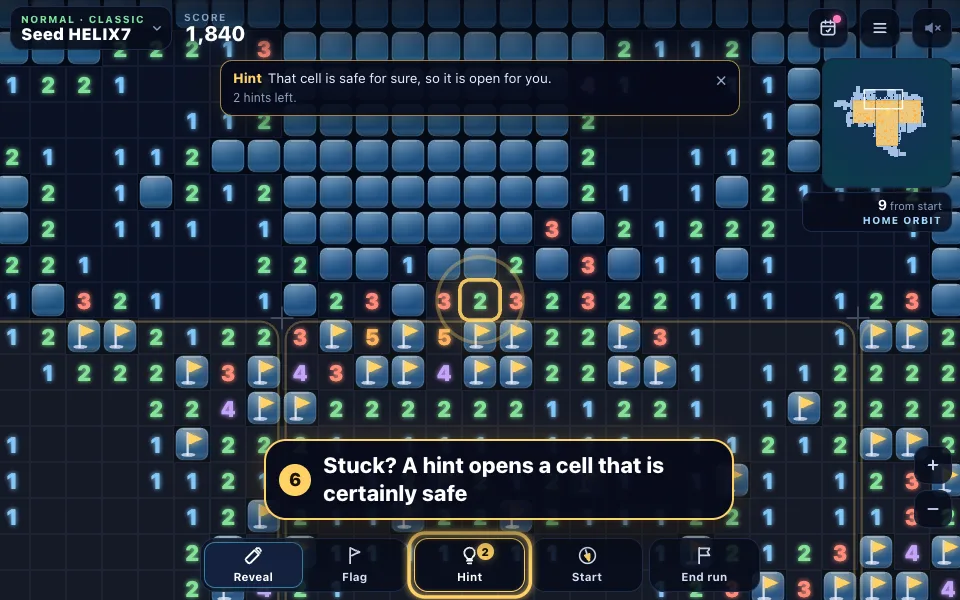
The hint reads the open numbers and opens a cell that is certainly safe, or flags a certain mine. If nothing can be proven, it shows the safest guess and keeps your hint.
The rules in full
- The goal: open as many safe cells as you can. Each one is a point, and the field goes on in every direction.
- Your run starts with a safe opening round the gold start ring. Every number tells you how many mines touch that cell, counting all eight neighbours, corners included.
- Tap or click a hidden cell to open it. A cell with no mines round it opens all its neighbours for you, and the opening spreads.
- Flag a cell you know is a mine: long-press it, right-click it, or switch the bar to Flag and tap. A flag protects the cell from a stray tap.
- When a number already has that many flags round it, tap the number to open all its other neighbours at once. This is called chording, and it is the quickest way across the field.
- Clear every safe cell in a 16 by 16 region for a bonus of 100 points and a safe hint (you can hold three). The region's mines are then flagged for you in gold, because they are certain.
- In Classic rules a mine ends the run and you keep your score. In Relaxed rules you have three lives, and a mine you hit stays on the field, marked.
- Press End run when you have explored enough to bank your score. Your best scores, biggest run and farthest distance go on your stats.
- Stuck? The Hint button opens a cell that is certainly safe or flags a certain mine near the middle of your view. If nothing can be proven, it shows the safest guess and keeps your hint.
Infinite Minesweeper tips and strategy
- A 1 touching exactly one hidden cell means that cell is a mine. Look for these first: they unlock everything round them.
- Along a straight edge, the pattern 1-2-1 has mines under both 1s and a safe cell under the 2. The pattern 1-2-2-1 has mines under the two 2s.
- Flag as you go and chord often. A tap on a satisfied number is faster and safer than opening its neighbours one by one.
- Work along the edge of what you have opened rather than tapping into the dark. A cell far from any number is a pure guess.
- Finish off regions that are nearly cleared. The 100-point bonus is worth as much as a hundred single cells, and it earns a hint.
- If you must guess, guess next to low numbers or where the hint says the risk is lowest, not in the middle of a cluster of 3s and 4s.
- Use the minimap and the Start button to find your way back. The compass on the button always points home.
- On Relaxed, a mine you hit counts as a known mine for the numbers round it, so you can keep using them.
- With deepening on, every 25 cells outward adds half a percentage point of mines. Bank a big run before the far zones get crowded.
From a fixed grid to an infinite minesweeper field
Mine-finding puzzles go back to the early days of home computers. The familiar form, a grid of hidden cells where each number counts the mines touching it, became famous in the early 1990s, when it came free with a popular desktop operating system.
Its classic boards are still the standard way to play: a small beginner square with 10 mines, an intermediate field of 16 by 16 cells with 40 mines, and an expert field of 30 by 16 with 99. Each one is a race to clear a fixed grid as quickly as you can.
Infinite minesweeper takes away the edge. The rules are the same, but instead of clearing a board you travel across one that never runs out. The question changes from how quickly you can finish to how far you can get, and every run has its own shape: a long corridor in one direction, a sprawling patch round the start, or a careful spiral.
Infinite Minesweeper rules, modes and difficulty
There are four mine densities. Easy has about 12 mines in every 100 cells, Normal 15.5, Hard 19 and Extreme 22.5: Normal matches the classic intermediate board almost exactly, Easy and Hard sit close to beginner and expert, and Extreme is a step beyond. Classic rules end the run on the first mine; Relaxed rules give you three lives and leave each mine you hit marked on the field.
Deepening, on by default, makes the field harder the further you go: half a percentage point more mines every 25 cells from the start, up to eight points more. The field changes colour as you travel too, from the blue of Home Orbit through the Teal Nebula and the Violet Deep to the Gold Frontier and beyond, so you always know how far out you are.
Scoring is simple: a point for every safe cell you open and 100 for every 16 by 16 region you clear. You keep your score when a run ends on a mine, so End run is for when you have had enough, not a way to protect your points.
Endless minesweeper strategy: patterns that keep you safe
Most of the field yields to two simple checks. A number that already has as many flags round it as it says makes every other neighbour safe, and a number with exactly as many hidden neighbours as mines still to find makes them all mines. When neither applies, reduce: take away the flags a number already touches, so a 3 with two flags beside it behaves like a 1, then compare it with the numbers next to it.
On an endless field you can almost always choose where to work. If one part of the frontier needs a guess, look elsewhere along the edge first: there is usually a cell somewhere that can be proven safe. Clearing regions as you go pays twice, with a bonus and a hint you can save for a real dead end.
The daily field and minesweeper seeds
Every day there is a new daily field, the same for everyone: Normal mines, deepening on, and one mine ends the run. Your first run of the day is the one that counts for the day's board and your streak; you can replay it for practice as often as you like, and play past days from the calendar.
Outside the daily, every run has a seed, a short code like K7QX2M shown at the top of the screen. The same seed with the same settings is the same field on any device, so you can share a link and race a friend across identical ground, or type in a seed you like and try it again.
Playing minesweeper online on your phone
On a phone, tap to open a cell and long-press to flag it; a ring fills round your finger so you know when the flag is coming. If you prefer, switch the bar to Flag so that a tap flags and a long-press opens. Drag to explore, flick to glide and pinch to zoom.
Tap Full screen, or turn your phone sideways, for the biggest view. You can choose how long a long-press takes in the settings, and turn on calm motion to stop the shaking, sparks and reveal waves. On a computer, use the mouse and wheel (right-click or Ctrl-click to flag), or play entirely from the keyboard with the arrow keys, Space and F.
How the field and the safe hint work
Whether a cell holds a mine depends only on the seed and the cell's position, so the field can be made a region at a time as you explore and is identical every time. The start and the cells round it never hold a mine, so every run begins with an opening. Only the cells you can see are drawn, so even a huge explored area stays smooth.
The safe hint is a solver, not a lucky guess. It reads the open numbers near the middle of your view, never trusting your flags, and looks for a cell that is safe in every arrangement of mines the numbers allow. If it finds one it opens it; if it finds a certain mine it flags it in gold; if a flag of yours is on a safe cell, it takes the flag off. When nothing can be proven, it shows you the lowest-risk guess and doesn't use up a hint.
Infinite Minesweeper FAQ
Is Infinite Minesweeper free?
Yes. It's free to play in your browser with no download and no account. Make a free account if you want your daily scores on the leaderboards on every device.
Does the field really never end?
Yes. The field is made from a seed a region at a time as you explore, in every direction, so there is no edge to reach. In practice the limit is how far you can travel before a mine or a guess stops you.
Is the first click safe?
Yes. Every run starts at the gold start ring, and the start and the cells round it never hold a mine, so your run always begins with an opening already made.
How do I flag a mine on my phone?
Long-press the cell until the ring round your finger fills. You can also switch the bar from Reveal to Flag, so that a tap flags and a long-press opens. On a computer, right-click, Ctrl-click on a Mac, or press F.
What is chording in minesweeper?
Chording opens every hidden neighbour of a number at once, once you have flagged as many mines round it as it says. Tap or click the number to chord, or use the middle mouse button. If one of your flags is wrong, chording sets that mine off, so flag carefully.
What happens when I hit a mine?
In Classic rules the run ends, the mines near you are shown, and you keep your score. In Relaxed rules you lose one of three lives, the mine stays marked on the field, and you carry on; the run ends when the third life goes.
How is the score worked out?
Each safe cell you open is a point, and each 16 by 16 region you clear completely adds 100. Your best scores are kept for each difficulty, along with your biggest run in cells and the farthest you have travelled from the start.
What does the safe hint do?
It opens a cell that is certainly safe, or flags a certain mine, near the middle of your view, using only the numbers you have uncovered. You start each run with three hints on Easy, two on Normal and one on Hard or Extreme, and earn one for every region you clear, holding three at most. If nothing can be proven, the hint shows the safest guess and isn't used up.
What is the daily field?
A new field every day, the same for everyone: Normal mines, deepening on, one mine ends the run. Your first run of the day counts for your streak and the day's board. Replays are for practice, and past days are in the calendar.
Can I play the same field as a friend?
Yes. Every run has a seed, shown at the top of the screen. Share your result and the link opens the new-run panel with the same seed and settings, ready to start, or type the seed into the panel yourself. A shared daily result links straight to that day's field.
What does deepening mean?
With deepening on, the field gets harder the further you go from the start: half a percentage point more mines every 25 cells, up to eight points more. Turn it off in the new-run panel for an even density everywhere.
Is my run saved?
Yes. Your run saves as you play, along with your stats, settings and daily results, in your browser. Close the page and it picks up exactly where you were, at the same spot on the field.
More games
Minesweeper
Classic Minesweeper with no-guessing boards, a safe first click, chording, best times and smooth controls for mouse, keyboard and touch.
PLAY →
Rocket Mosaic
Every number counts the filled tiles around it. Use them to colour the grid and reveal a hidden picture, from quick 10×10 puzzles to grand 30×30 scenes.
PLAY →
Nonograms
Fill the grid from the number clues to reveal a hidden pixel picture. A daily puzzle, unlimited puzzles from 5×5 to 25×25 and an album of hundreds of pictures.
PLAY →